Track payments
See paid, partly paid, unpaid and overdue invoices at a glance.
The top of the invoices page shows your totals, and the smart views take you straight to the invoices that need attention.

- Four totals
- Smart views
| Total | Meaning |
|---|---|
| Total invoiced | The amount you have billed, and how many bills |
| Payments collected | What customers have paid |
| Pending receivables | What is still to be paid |
| Overdue invoices | Invoices past their due date |
#Smart views
| View | Shows |
|---|---|
| All Invoices | Everything |
| Paid (100%) | Invoices paid in full |
| Partial Advance | Invoices with a part-payment |
| Unpaid and Pending | Invoices nobody has paid yet |
| Overdue Bills | Invoices past their due date |
| High Value (₹1L and above) | Large invoices worth watching |
| Proforma Invoices | Pro-forma invoices |
| Invoiced Today | Bills raised today |
#Find a specific invoice
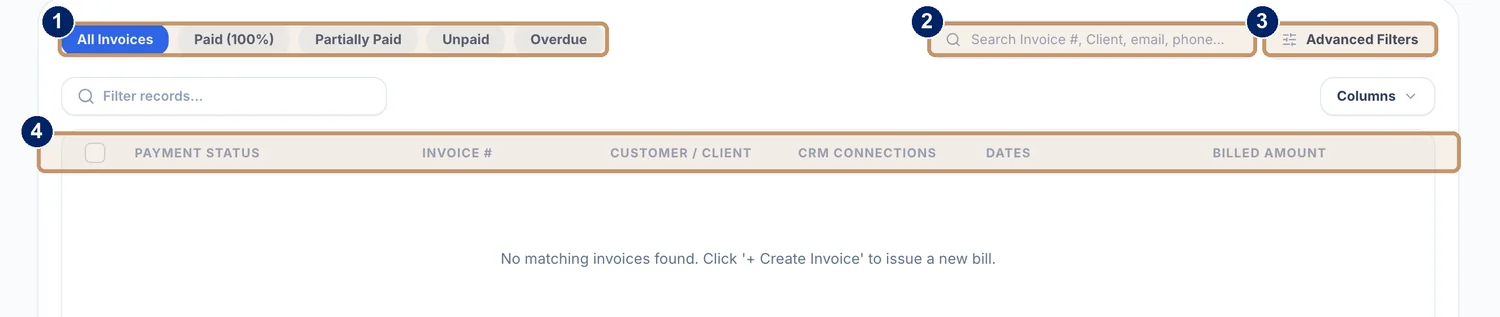
- Filters for All Invoices, Paid, Partially Paid, Unpaid and Overdue
- Search by invoice number, client, email or phone
- Advanced Filters
- Columns: payment status, invoice number, customer or client, CRM connections, dates and billed amount
Pick a status
Choose All Invoices, Paid (100%), Partially Paid, Unpaid or Overdue.
Search
Type an invoice number, a client name, an email address or a phone number.
Narrow it down
Use Advanced Filters, and the Columns button to choose what the list shows.
Open an invoice
Open it to record a payment, download the PDF receipt or see the CRM deal it is linked to.
Tip
Start the week with Overdue Bills. A short polite reminder, sent early, collects more than a long one sent late.