Authentication
Sign in, handle two-factor, refresh your token and send it on every request.
AOZO uses a session token. You sign in with the same credentials a person uses, receive a token, and send it as a Bearer token on every call.
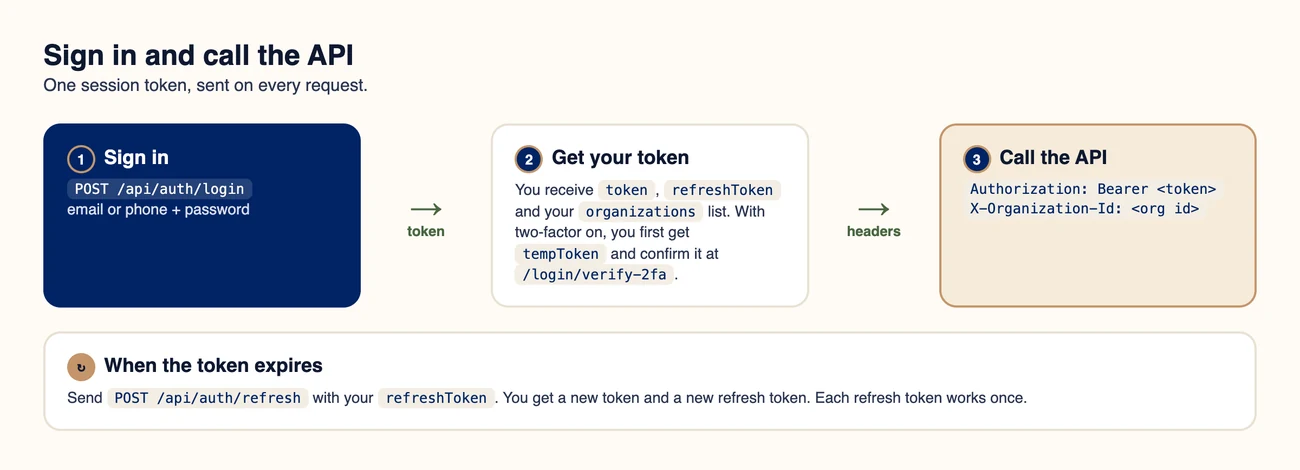
Sign in once, then send the token on every request.
#Sign in
curl -X POST https://api.aozo.in/api/auth/login \
  -H "Content-Type: application/json" \
  -d '{ "email": "you@company.com", "password": "your-password" }'
You can also send the account’s phone number in the identifier field instead of email. A successful response returns your tokens, your profile and your organisations.
{
  "token": "eyJhbGciOi…",
  "refreshToken": "9f3c…",
  "user": { "id": 12, "email": "you@company.com", "name": "Meera Shah", "avatarUrl": null },
  "organizations": [
    { "id": "ORG_ID", "orgUid": "ORG-8AA85C26", "name": "Sharma & Co.", "role": "OWNER" }
  ]
}#If two-factor is on
When the account has two-factor sign-in, the first call does not return a token. It returns a temporary token and tells you which method to use.
{
  "requires2fa": true,
  "two_factor_type": "email",
  "available_methods": ["email"],
  "tempToken": "eyJhbGciOi…"
}
Collect the code
For email, AOZO sends a one-time code to the account’s email. For an authenticator app, read the current code from the app.
Verify it
Send the temporary token and the code to /api/auth/login/verify-2fa. The temporary token is valid for 10 minutes.
Receive your tokens
The response has the same shape as a normal sign-in.
curl -X POST https://api.aozo.in/api/auth/login/verify-2fa \
  -H "Content-Type: application/json" \
-d '{ "tempToken": "eyJhbGciOi…", "code": "123456" }'Accounts that sign in only with a passkey cannot use this flow. Use an account with a password and an email or authenticator code for server integrations.
#Call the API
curl https://api.aozo.in/api/auth/me \
-H "Authorization: Bearer YOUR_TOKEN"#Refresh your token
When the token expires, exchange your refresh token for a new pair. Each refresh token works once, so always store the new one.
curl -X POST https://api.aozo.in/api/auth/refresh \
  -H "Content-Type: application/json" \
-d '{ "refreshToken": "9f3c…" }'{ "token": "eyJhbGciOi…", "refreshToken": "a71d…", "user": { "id": 12, "email": "you@company.com", "name": "Meera Shah" } }#Sign out
curl -X POST https://api.aozo.in/api/auth/logout \
  -H "Content-Type: application/json" \
-d '{ "refreshToken": "a71d…" }'Never share your token or refresh token, and never commit them to code. If one leaks, sign out the session and change your password.