Send leads into CRM with a webhook
Post leads from your website, forms or automation tools straight into AOZO CRM.
The lead capture webhook lets another system create a lead in AOZO CRM with one HTTP call. No sign-in is needed. Instead, you send your organisation id and your organisation’s webhook key.
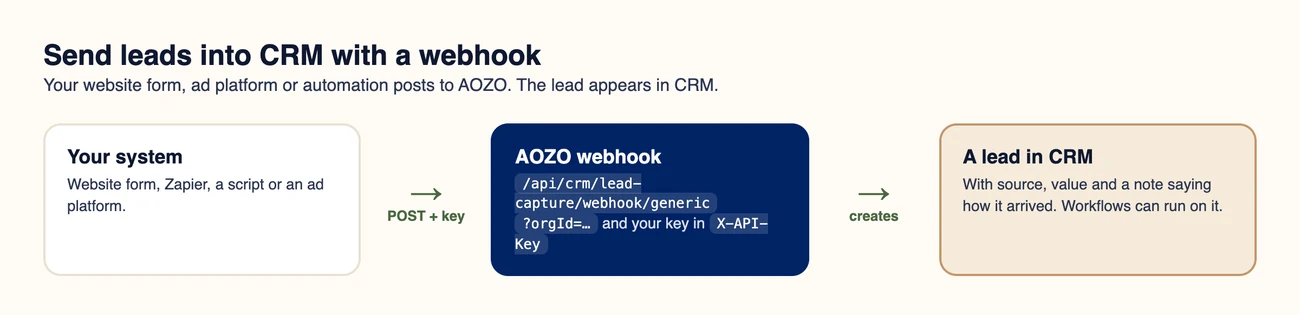
One POST creates one lead.
#Find your organisation id and key
Both are returned by one authenticated call. Keep the key private: anyone with it can add leads to your CRM.
curl https://api.aozo.in/api/crm/lead-capture/channels \
  -H "Authorization: Bearer $TOKEN" \
-H "X-Organization-Id: $ORG"{
"organizationId": "ORG_ID",
"webhookKey": "3f9a…",
"baseWebhookUrl": "https://api.aozo.in/api/crm/lead-capture",
"stats": { "WEB": { "count": 12, "totalValue": 340000 } },
"recentCaptures": []
}#Post a lead
Choose the URL
Use https://api.aozo.in/api/crm/lead-capture/webhook/generic and add your organisation id as orgId.
Send your key
Put the webhook key in the X-API-Key header. Always send it.
Send the lead as JSON
Include at least a name. Add whatever else you have.
curl -X POST "https://api.aozo.in/api/crm/lead-capture/webhook/generic?orgId=ORG_ID" \
  -H "X-API-Key: YOUR_WEBHOOK_KEY" \
  -H "Content-Type: application/json" \
-d '{ "name": "Sharma Traders", "email": "orders@example.com", "phone": "+91 98765 43210", "company": "Sharma Traders", "source": "WEBSITE", "value": 48500, "notes": "Asked for a demo" }'{ "success": true, "leadId": 149, "lead": { "id": 149, "name": "Sharma Traders", "status": "NEW", "source": "WEBSITE", "value": 48500 } }#Fields it understands
| Send | Also accepted as | Notes |
|---|---|---|
| name | fullName, first_name | Defaults to “Webhook Lead” if missing |
| emailAddress | Optional | |
| phone | phoneNumber, mobile | Optional |
| company | companyName, organization | Optional |
| source | Upper-cased. Defaults to WEBHOOK | |
| value | dealValue, budget | In rupees. Defaults to 0 |
| status | Defaults to NEW | |
| score | Defaults to 50 | |
| notes | Defaults to a note saying the lead arrived by webhook |
Each lead gets an activity note saying how it arrived, and your CRM workflows can run on it, for example to assign it to the next person on the team.
#Errors
| Status | Meaning |
|---|---|
| 400 | The organisation id is missing or not valid |
| 401 | The webhook key is not valid |
| 500 | Something went wrong on our side. Retry later |
#Other lead channels
AOZO CRM also has inbound webhooks for Google Ads lead forms, Meta (Facebook and Instagram) lead ads and WhatsApp. Each has its own payload format and is set up from CRM lead capture settings.
Treat the webhook key like a password. Do not put it in public web pages or mobile apps. Send leads from your server or from an automation tool instead.