Quickstart
Sign in, create a lead and list your leads in three commands.
This takes about five minutes. You need an AOZO account with a password and access to AOZO CRM.
Sign in and save your token
Replace the email and password. The command prints your token and your organisation id.
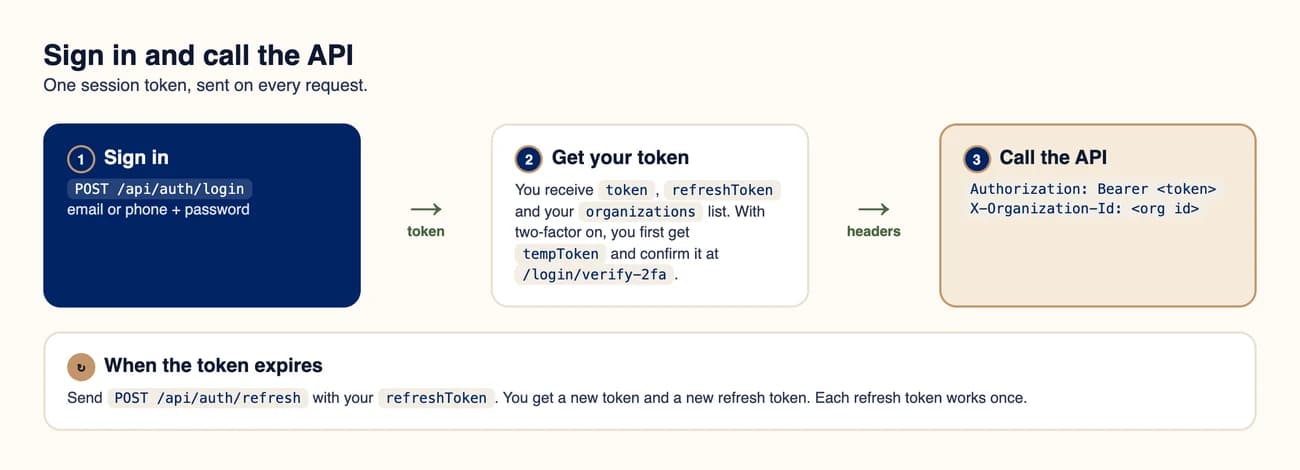
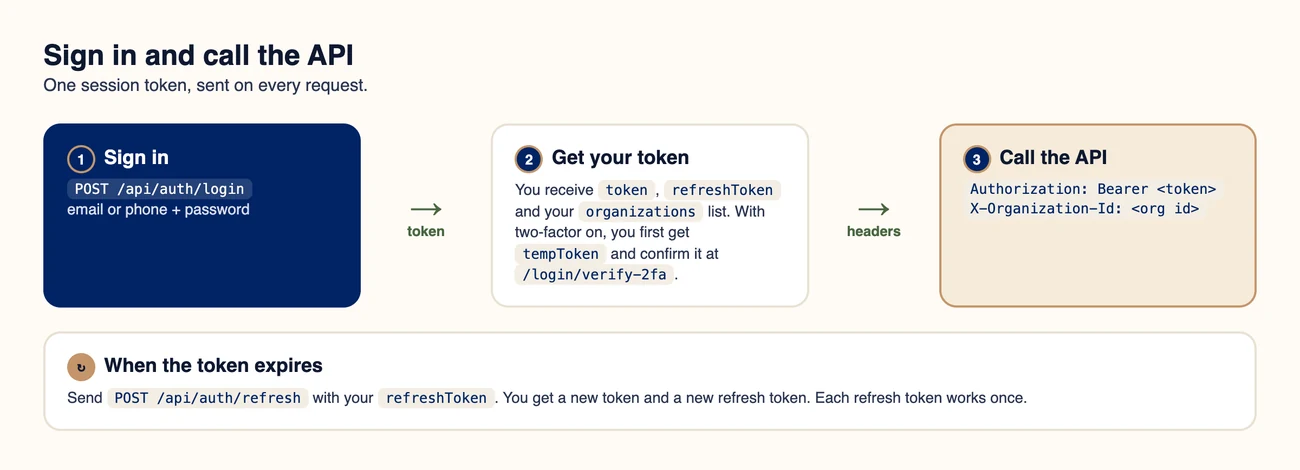
Sign in once, then send the token on every request.
Create a lead
Send a POST to /api/crm/leads with the token and organisation id. Only name is required.
List your leads
Send a GET to the same path and check that the new lead is in the array.
bash (needs curl and jq)
# 1. Sign in
RESPONSE=$(curl -s -X POST https://api.aozo.in/api/auth/login \
  -H "Content-Type: application/json" \
  -d '{ "email": "you@company.com", "password": "your-password" }')
TOKEN=$(echo "$RESPONSE" | jq -r .token)
ORG=$(echo "$RESPONSE" | jq -r '.organizations[0].id')

# 2. Create a lead
curl -s -X POST https://api.aozo.in/api/crm/leads \
  -H "Authorization: Bearer $TOKEN" \
  -H "X-Organization-Id: $ORG" \
  -H "Content-Type: application/json" \
  -d '{ "name": "Sharma Traders", "company": "Sharma Traders", "email": "orders@example.com", "source": "WEB", "value": 48500 }'

# 3. List leads
curl -s https://api.aozo.in/api/crm/leads \
  -H "Authorization: Bearer $TOKEN" \
-H "X-Organization-Id: $ORG"#The same in Node.js
Node.js 18 or later
const BASE = "https://api.aozo.in";

const login = await fetch(`${BASE}/api/auth/login`, {
  method: "POST",
  headers: { "Content-Type": "application/json" },
  body: JSON.stringify({ email: "you@company.com", password: "your-password" }),
}).then((r) => r.json());

const headers = {
  Authorization: `Bearer ${login.token}`,
  "X-Organization-Id": login.organizations[0].id,
  "Content-Type": "application/json",
};

const lead = await fetch(`${BASE}/api/crm/leads`, {
  method: "POST",
  headers,
  body: JSON.stringify({ name: "Sharma Traders", source: "WEB", value: 48500 }),
}).then((r) => r.json());

console.log("Created lead", lead.id);
Tip
If sign-in returns requires2fa, finish with /api/auth/login/verify-2fa first. See Authentication.