Set up your organisation profile and domain
Add your name, GSTIN, logo, colours, branded subdomain and custom domain.
Organisation settings are where your workspace gets its identity. The details you add here appear on documents and give your team and clients a branded address.
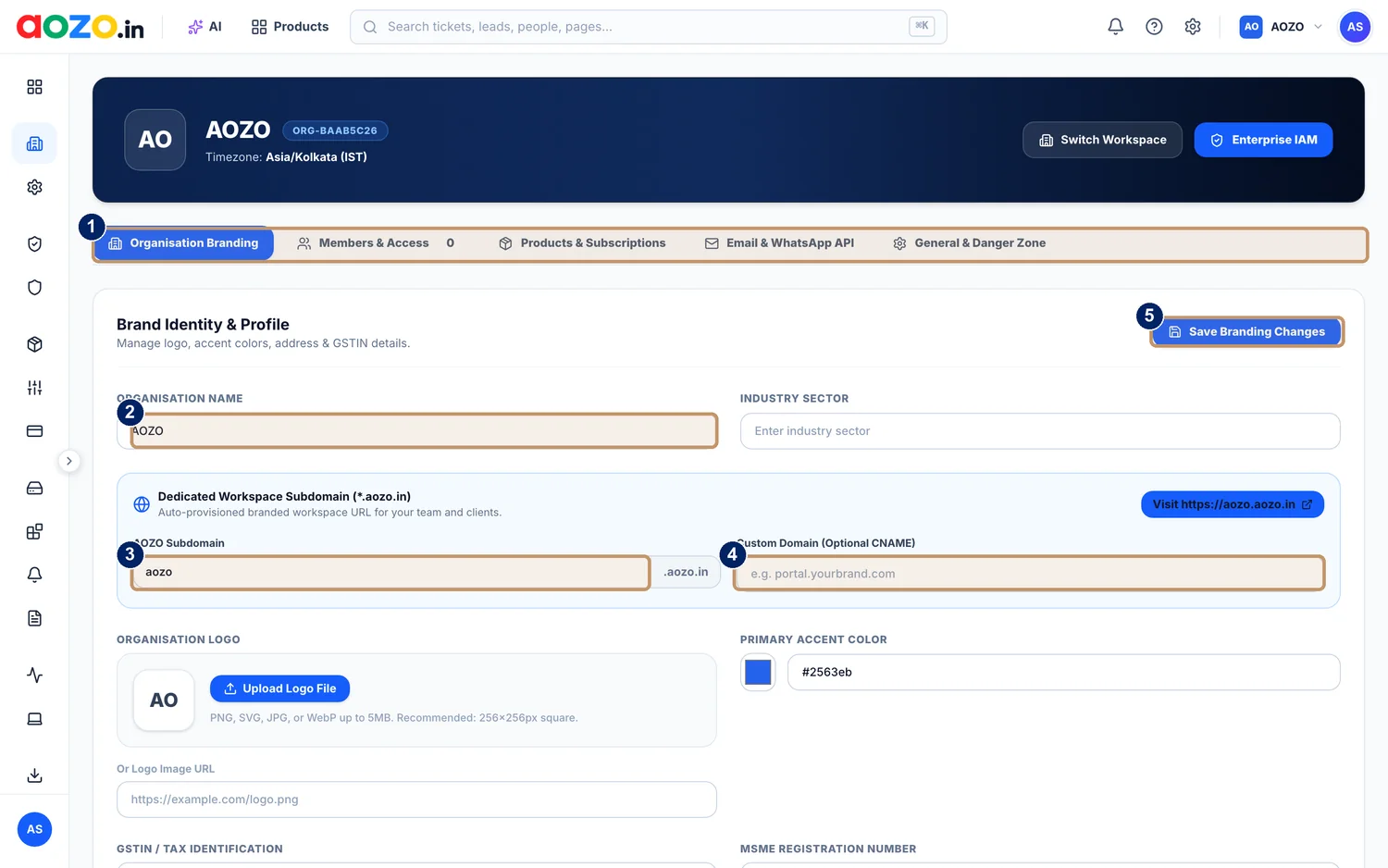
- Section tabs: Organisation Branding, Members and Access, Products and Subscriptions, Email and WhatsApp API, General and Danger Zone
- Organisation name
- Dedicated workspace subdomain (yourname.aozo.in)
- Custom domain, optional, using a CNAME
- Save Branding Changes
Open organisation settings
Open your workspace settings and choose Organisation Branding.

- Organisation settings tabs
Enter your organisation name and industry
Add the name your customers know you by, and your industry sector.

- Organisation name
Choose your subdomain
Your workspace gets a dedicated address ending in .aozo.in. Pick a name your team will remember.

- Subdomain, ending in .aozo.in
- Custom domain (optional)
Add a custom domain (optional)
To use your own address, enter a custom domain such as portal.yourbrand.com. It uses a CNAME record that you add at your domain provider.
Add your logo and colour
Upload a logo (PNG, SVG, JPG or WebP up to 5 MB, 256 by 256 pixels recommended) or paste a logo link, and choose your accent colour.
Add your tax details
Scroll to GSTIN, tax identification and MSME registration number, and fill in what applies to you.
Save
Choose Save Branding Changes.

- Save Branding Changes




#The other tabs
| Tab | What it is for |
|---|---|
| Members and Access | Who is in the workspace and what they can do |
| Products and Subscriptions | Which apps are on and their plans |
| Email and WhatsApp API | How the workspace sends email and messages |
| General and Danger Zone | Workspace-wide settings and irreversible actions |
Be careful in General and Danger Zone. Actions there can be hard to undo.