Set up once. Secure everywhere.
Every AOZO app shares one login and one set of records, so protecting your workspace happens once and covers everything. Here is what AOZO does, what you control, and how to set it up.
- Email OTP, authenticator apps, passkeys
- Roles and activity logs
- Built around the DPDP Act, 2023
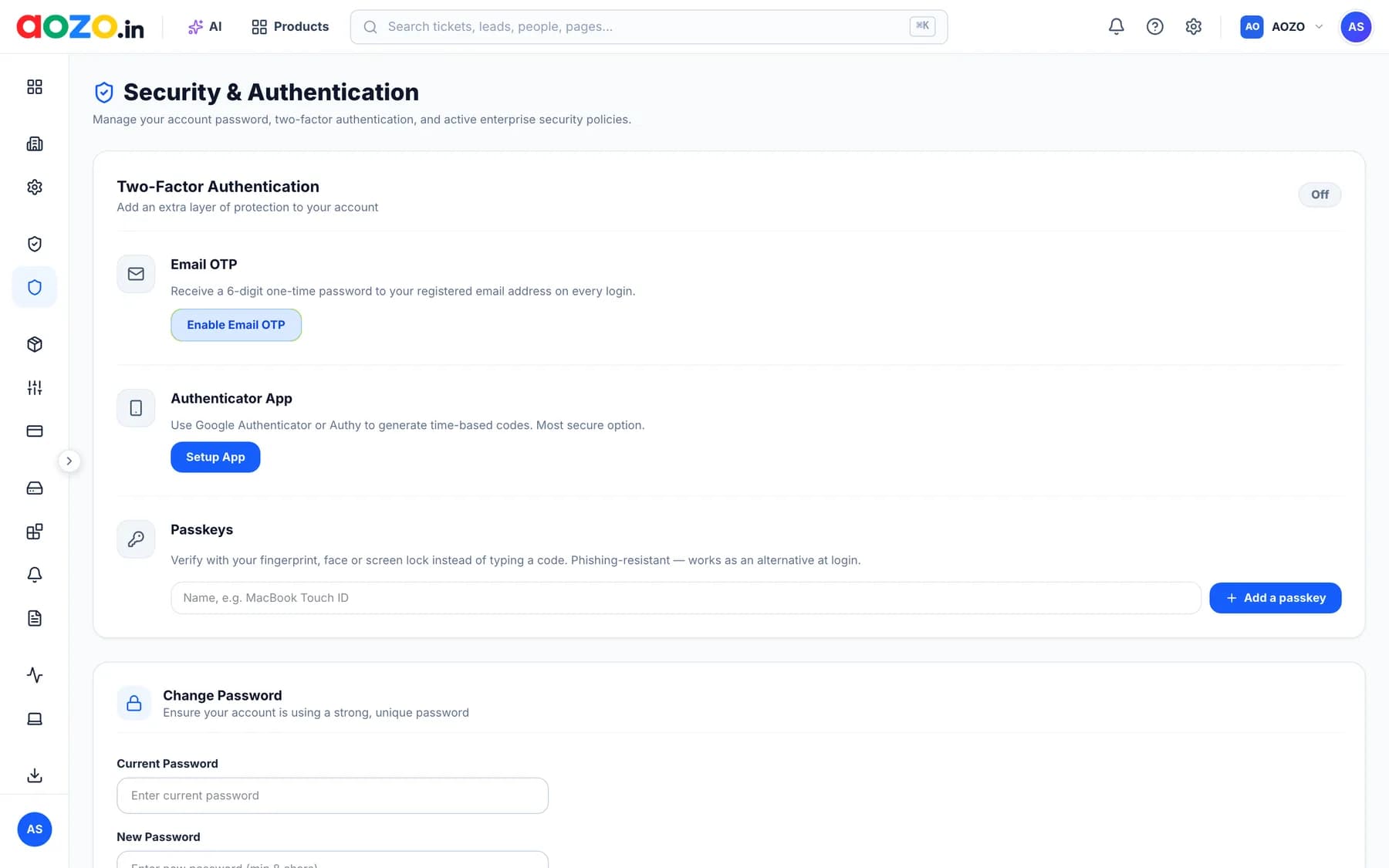
Product screen with sample data.
Security at a glance
Protected sign-in
Email OTP, authenticator apps and passkeys keep accounts safe, across every AOZO app at once.
Access by role
Decide who sees what. People get access to the screens and records their job needs.
Activity you can trace
Activity logs show who changed what, so you can answer questions after the fact.
Privacy by design
Our data practices are written around India’s Digital Personal Data Protection Act, 2023.
Three ways to protect sign-in
Turn them on from the Security and Authentication page in your workspace. You can use more than one.
| Method | How it works | A good fit for |
|---|---|---|
| Email OTP | A 6-digit one-time code is sent to your registered email address when you sign in. | Teams that want an easy extra step with no extra app. |
| Authenticator app | An app such as Google Authenticator or Authy generates time-based codes on your phone. | Admins and anyone with access to sensitive records. |
| Passkey | Verify with your fingerprint, face or screen lock instead of typing a code. It resists phishing and can be used as an alternative way to sign in. | People who want the quickest sign-in with strong protection. |
The right people see the right things
Roles and permissions decide who sees what. Activity logs show who changed what.
- Roles for every jobFor example, AOZO POS gives owners, cashiers, waiters and kitchen staff separate logins, and each sees only their own screen.
- Least access by defaultGive people the access their work needs, and widen it only when it is needed.
- A record of changesActivity logs help you answer “who changed this, and when?” without guessing.
One login means one place to manage access
CRM, Helpdesk, Projects, Accounting, Teams and Hubble share one login. When someone leaves, you remove their access in one place instead of six.
See the appsYour data stays yours
Used only to provide AOZO
Business data you enter, such as customers, tickets, invoices and employees, belongs to you. We process it only to provide the service and on your instructions.
Never sold
We never sell your personal data. We share it only with service providers who help run AOZO, as the law requires, or in a business transfer with notice to you.
Providers held to the same standard
Service providers are bound to protections no less strict than our DPDP Addendum, and transfers outside India follow what the DPDP Act permits.
Export and deletion
When a subscription ends you can export your data for a reasonable period. After that we delete it from our systems unless the law says we must keep it.
Shared responsibility
Good security is a partnership. Here is who does what.
AOZO What we do
- Offers two-factor sign-in with email OTP, authenticator apps and passkeys.
- Gives you roles and permissions, and activity logs.
- Processes your business data only to provide the service you subscribed to.
- Limits access to personal data to people who need it to provide AOZO.
- Binds service providers to protections no less strict than our DPDP Addendum.
- Tells you without undue delay if a personal data breach affects your data.
You What you do
- Turn on two-factor sign-in for your own account and your team.
- Give each person the role they need and nothing more.
- Remove access when someone leaves or changes role.
- Keep passwords, passkeys and sign-in codes private.
- Only enter personal data you have a lawful basis to process.
- Review activity logs and tell us if something looks wrong.
Secure your workspace in 8 steps
Most of this takes a few minutes. Tick them off as you go.
Open your workspaceIf something goes wrong
If a personal data breach affects your data, we will tell you without undue delay, share what we know, and help you meet your duties to the Data Protection Board of India and affected people.
Think you have found a security problem? Write to us with the subject “Security concern”. Tell us what you found and how to reproduce it.
Security questions
How does AOZO protect my account?
AOZO offers two-factor sign-in with email OTP, authenticator apps and passkeys. You can also set roles and permissions so people see only what they need, and use activity logs to see who changed what.
Does AOZO sell my data?
No. We never sell your personal data. Business data you enter into AOZO is processed only to provide the service. See the Privacy Policy for details.
Who can see the data in my workspace?
The people you invite, according to the roles and permissions you and your administrators set. AOZO limits its own access to people who need it to provide the service.
What happens to my data if I stop using AOZO?
When a subscription ends you can export your data for a reasonable period. After that, AOZO deletes it from our systems unless the law requires us to keep it. The DPDP Addendum explains this in full.
What if there is a data breach?
If a personal data breach affects your data, we will tell you without undue delay and help you meet your own duties under the DPDP Act.
Does AOZO have security certifications?
We have not listed any certifications on this page. If your team needs specific security documentation, write to support@aozo.in and tell us what you need.
How do I report a security problem?
Write to support@aozo.in with the subject “Security concern”. Describe what you found and how to reproduce it, and we will take a look.
Put your team in one secure place
Create a workspace, turn on two-factor sign-in, and add the apps you need.
- Email OTP, authenticator apps and passkeys
- Roles and activity logs
- Practices built around the DPDP Act, 2023