Take orders at the counter
Use the POS screen for dine-in, takeaway and delivery, with GST and UPI.
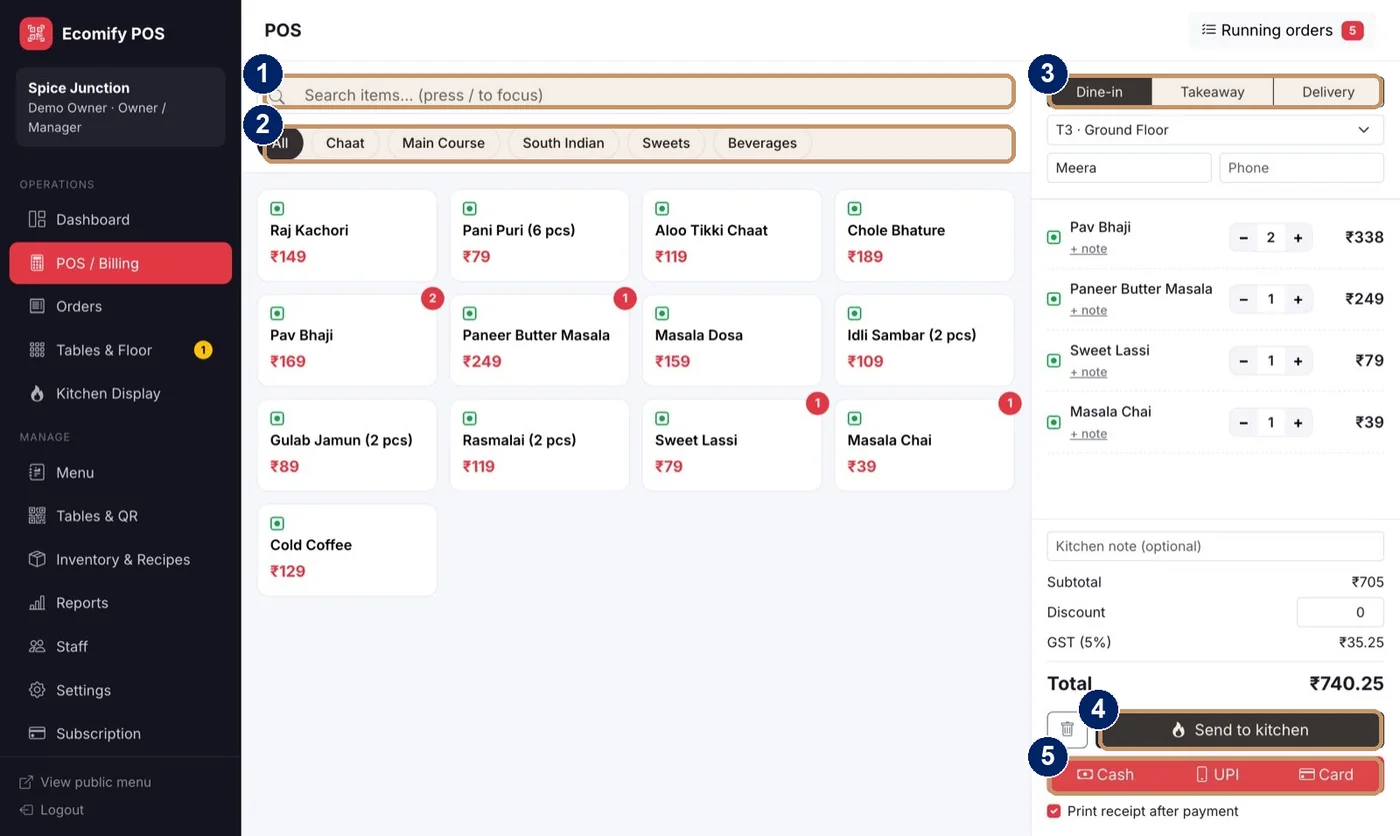
- Search items, and press / to focus
- Menu categories and veg filter
- Order type: Dine-in, Takeaway or Delivery
- Send to kitchen
- Payment: Cash, UPI or Card
Open POS and Billing
Choose POS and Billing in the left menu.
Choose the order type
Pick Dine-in, Takeaway or Delivery. For dine-in, choose the table.
Add items
Search for a dish or tap it in the menu. Use the minus and plus buttons to change quantity, and add a note such as “less spicy”.
Add the customer and a kitchen note
Enter a name and phone if you need them, and a note for the kitchen.
Check the bill
The panel shows subtotal, discount, GST and the total.
Send to kitchen
Choose Send to kitchen. The ticket appears on the kitchen display.
Take payment
Choose Cash, UPI or Card. Tick “Print receipt after payment” to print on an 80mm printer.
Tip
Use “add items to running order” to add a second round to a table’s open order instead of starting a new bill.